Posts

SQL Server – Instance not starting or crashing immediately. Event 5161. TempDB error

Image
This is one of the (nightmare) situations in which no DBA want to get into, especially if it is your PROD SQL Server. But if you've already got yourself into one of such situations then you've come to right place. In this article we will see how to overcome one such situation where SQL Server instance doesn't come back or crashes immediately after starting the services in case you've just changed the location of your “TempDB” database. Test Scenario To start with we picked a test SQL Server Cluster and added few more “Tempdb” files to it in its default location which was in C: drive here.  Why Cluster? Because clusters are bit more complicated to troubleshoot and also took a while to get to it, so, I thought it is good if I go this way. We will however also cover steps for stand-alone server as well.  Once all the files have been added we used the following T-SQL statements to move them to new location. ...

SQL Server - T-SQL script for database index maintenance

A good thing about "time" is that it also helps in adding more to our knowledge and knowledge is a powerful tool which helps us in implementing new things or may be see old things in new way. I recently revisited one of my old script which was for DB index maintenance and I've realized that it had become obsolete as technology and usage of the databases has changed over the years like now we are using more of high availability options, so this script should evolve as well. Moreover on certain SQL boxes it was not behaving as I intend it to be, so one fine day I sat down and decided to update the same. As earlier this script can choose the type of index maintenance to be performed i.e. "Rebuilding" or "Reorganising" of the index after calculating the fragmentation level of an index. However this time around I've wrapped up the script in a stored procedure as on some boxes putting the script directly in the job was throwing "Syntax error...

SQL Server - 2008/2012 - Not able to view list of databases in SSMS - Error 916 - not able to access database under current security context

Image
Last month, a user comes up to me with a very unusual problem. He was not able to see list of databases under the "Databases" group\folder when connecting to a remote SQL Instance using SSMS (SQL Server Management Studios). He was getting the below error: Now, before coming up to the solution let me have some pointers about this issue or case as error message " not able to access database 'xyz' under the current security context " can occur due to several reasons, but we are intend to discuss only one particular case in this post. The pointers are as follows: Login is part of "public" server role and also had adequate access to the database, which user wanted to use. Also, no granular level deny was applied to the login. Though the login didn't had any explicit permissions to the database for which the error was thrown but the user was also not intended to use the database. Considering above points and unde...

SQL Server - Processor Settings - Part 2 - Processor affinity mask and others

Image
Welcome back everyone to second and last part of our processor settings series. T hough it was not as soon as I expected it to be, but as saying goes, better late than never.  It is important to cover these options\settings because unlike the settings we discussed in part 1  (like MAXDOP etc.) of this series, tweaking these options can have a huge negative impact on system, so it is better to have more details about them so that we can be more clear whether to proceed or not. First up is the "Processor Affinity Mask". In the below image you can see a brief description of "Processor affinity mask" directly out from Books Online\MSDN. Image 1 So, long story short, by using "processor affinity mask" (or I/O affinity mask, both go in conjunction) option in multi processor environment, you can decide which processor or core only should be used for processing the query (only) and which can be used for other tasks (like I/O) hence reducin...

SQL Server - Using MAXDOP and other processor settings - Part 1

Image
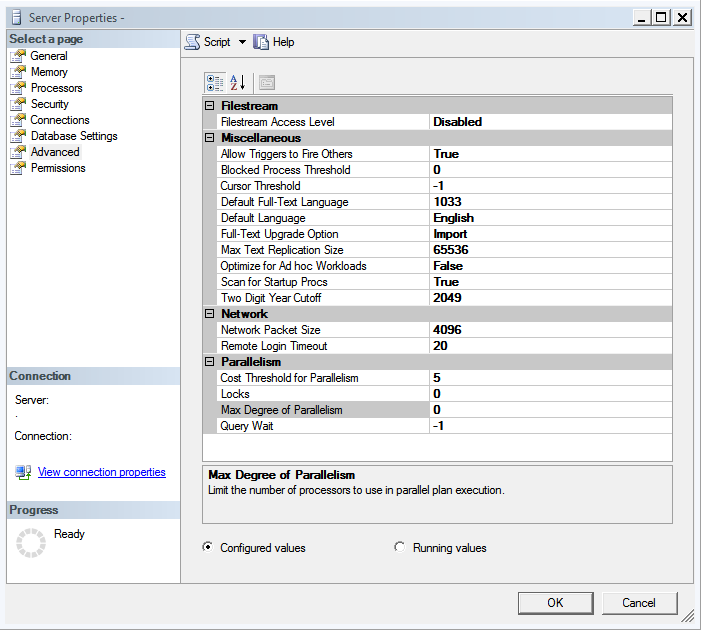
After discussing about memory settings in my previous post , comes next set of important settings available which are related to processor. Just like memory settings SQL Server has provided several options, which we can tweak to get an optimal performance from the processor(s) hooked to a SQL based Server. In first part of this topic I would write about the most important option MAXDOP, which is short for "Max(imum) Degree of Parallelism". This parameters takes a numeric value, which is equivalent to the number of processor(s) SQL Server can use in parallel in order to process a resource heavy query.  The default value for this option is "0" which means SQL Server will use all available CPUs (or CPU Cores) in case it chooses to go for parallelism. Yes, you read that right "if SQL Server chooses to". Some of you may get surprised to know this but SQL Server doesn't always go for parallelism for each query. There is a threshold value defined fo...