Posts

SQL Server - T-SQL to perform index maintenance on a database

Hi There, Looking for the index maintenance script. A new, smarter database index maintenance script has been created and is available on this "link" .  The new script has all the existing advantages like selecting type of maintenance based on level of fragmentation etc. along with some new improved functionality like support to mirrored database. Please follow the link above to get to the right post and script. Thank you very much for following this blog.
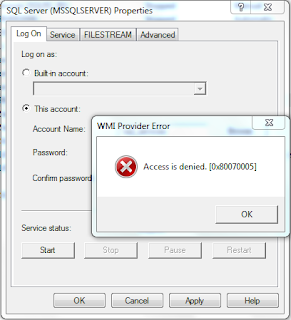
SQL Server - WMI Provider Error (Access is Denied) while changing service account using SQL Server Configuration Manager

Image
Coming back to my blogs nearly after 3 action packed months with another interesting topic (I hope), which is on a common WMI error which haunts many DBAs. In a DBA's lifetime, he\she has changed SQL services account and\or its password at-least once and many of us may agree that they have faced "WMI Provider Error - Access is Denied" error while changing the password using "SQL Server Configuration Manager". So, for those of us who are still looking for clues, let us try to understand what happened here with an example:  Let's assume that you have joined an organisation and where they have "CompDomain\SQLsrvAccount" fixed domain account under which all your SQL Services runs. Now, a new security policy have been enforced according to which you have to recycle\change your password (due to any condition). Now, you've the new policy perfect password in your possession along with planned maintenance down-time, you went to the server ope...

SQL Server - T-SQL script to attach database with multiple files

Last week I was working on one of our regular database restore tasks and as a part of it, I was also required to detach and attach the database (with around 100 additional data files) on different SQL server instance.  Now, if your source and destination servers have same disk partition and folder hierarchy, than attaching a database is quite a straight job. All you need to do is just copy all the database files from source server to same named folder and under same folder hierarchy on the destination server and then attach the database using the SSMS or T-SQL statement pointing to the primary data (mdf) file only and you're done. SQL Server will take care of listing and attaching the remaining files. But the tricky part comes in when destination server doesn't have same (name of the) disk partition or can't use the same folder/database file path (like may be same disk partition on the destination server doesn't have enough space to host that database). ...

SQL Server - T-SQL script to extract out create statement of foreign keys

After a lot of thinking that what should I put in my first technical post, I zeroed in to this script which comes very handy to me at a times.  The following T-SQL script help in extracting out "Create Statements" of all the foreign keys for a given database. This script can be very useful when we have to do a lot of data transfer (may it be for whole database or for several tables) from one database to another while having tables with lot of parent-child relationship in them. In such case we can extract out the foreign keys (using the below mentioned script), drop them, import the data and create the relationships back. Or simply if you have to port all the  new foreign key relationships you have created lately on you local or dev database and want them to be created on some other database (may be other local or dev database etc..) for enhanced testing, in just few clicks. declare @crlf char(2), @cmd varchar(max), @debug bit set @debug = 1 set @cmd = ''...

The First Blog: Introduction

Welcome to my very first blog. I thought it is better to start my blog with a brief introduction of me and the purpose of starting this Blog. I am Siddharth Chauhan  working as Microsoft SQL Server Database Administrator with over 5 years of experience (as of today i.e. 18th of October, 2012). In these five years I have worked with several companies, all serving in different domains and having different kind of work and work culture. In all I have worked in various fields i.e. from development to administration, from database to B.I. (SSIS, SSRS) and several other DB technologies like MySQL and Sybase ASE 12. All these years have been a very good learning experience, where I got an opportunity to work with and/or under some very knowledgeable peers (and still working with such peers) and also got to learn a lot from my work as well. And this (knowledge) is the main purpose to start this Blog, to share whatever knowledge I was able to collect over these years a...